
How to Use LienSpot’s Redemption Calculator to Track Costs and Returns
A tax lien’s interest rate tells only part of the story. Your return also depends on what you paid to acquire the lien, the expenses you incur along the way, which costs are recoverable at redemption, and any fees or penalties payable to you.
LienSpot’s redemption calculator brings those details together on each lien’s Accounting page. Use it as a cost tracker throughout the investment, estimate the redemption price for a selected date, and record your actual results when the lien is redeemed.
Start with the four numbers that matter
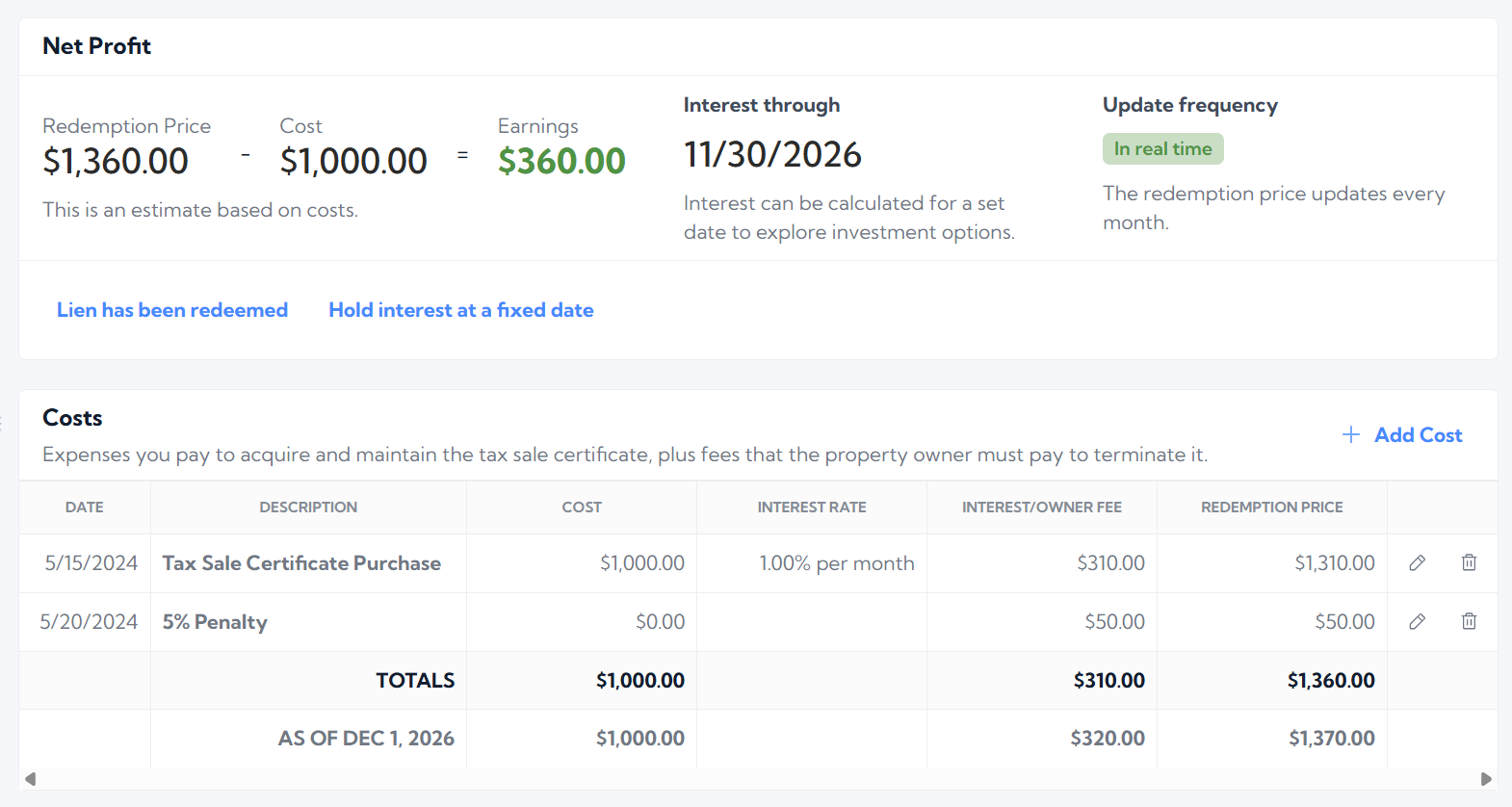
The Accounting page connects your entries to the financial picture of your investment:
- Redemption price: The estimated amount payable at redemption, based on the costs, recoverable amounts, interest, and owner fees you enter.
- Cost: Your total investment in the lien, including expenses that will not be recovered at redemption.
- Net: The redemption amount minus your costs.
- ROI: Your net return expressed as a percentage of your costs.
Before redemption, these figures help you evaluate the investment using an estimate. After you enter the actual redemption amount, your net reflects the result you received.
1. Enter your purchase and other expenses
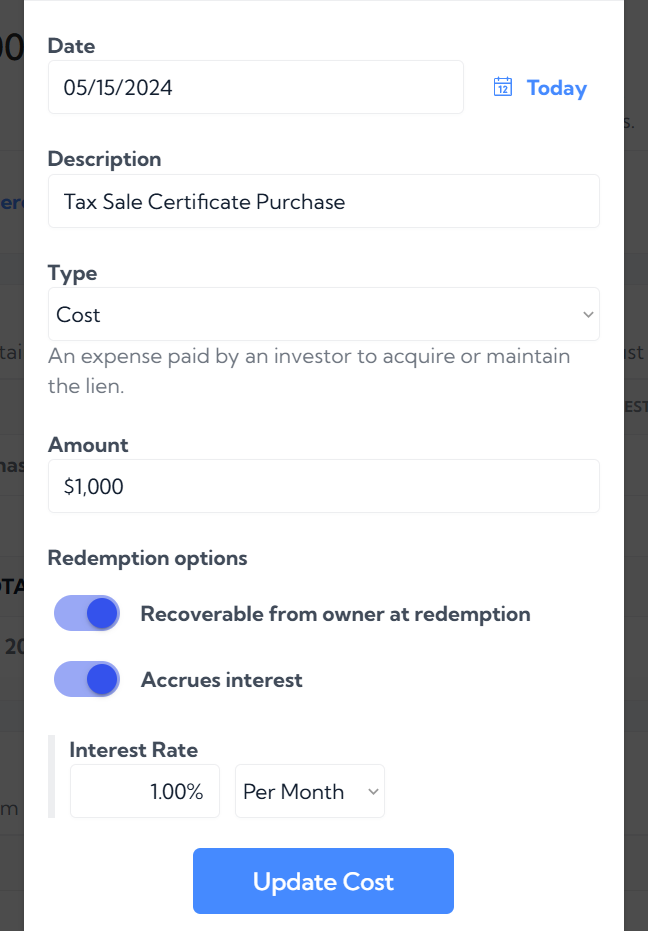
Open the lien’s Accounting page and select Add Cost. Start with the amount you paid to acquire the tax sale certificate or lien, then add expenses as they occur.
For each expense, enter:
- Date: When the cost was incurred.
- Description: A clear label, such as “Tax Sale Certificate Purchase” or “Certified Mail.”
- Type: Select Cost for an expense you paid to acquire or maintain the lien or Owner Fee for an amount paid by the owner at redemption without recording an expense
- Amount: The amount you spent.
Next, set the redemption options for that entry.
Turn on Recoverable from owner at redemption when the expense is payable back to you at redemption. If it is an expense you must absorb, leave that option off. Both affect your investment cost, but only recoverable expenses add their principal amount to the estimated redemption price.
If the entry earns interest, turn on Accrues interest and enter the applicable rate and period, such as 1.00% per month or 10% per year. Leave it off for entries that do not earn interest.
Treat each expense separately. Your certificate purchase, title research, and mailing expenses may have different recovery and interest rules. Enter the treatment that applies to each item rather than applying one assumption to everything.
2. Add owner fees and penalties without inflating your costs
Some amounts payable to you at redemption do not represent money you spent. An owner-paid fee is different from reimbursement for an investor expense.
Use the "Owner Fee" type for these amounts. This allows the amount to contribute to the estimated redemption price without increasing your investment cost.
3. Let interest update, or choose an “interest through” date
By default, LienSpot updates interest automatically each month, keeping your estimates current without requiring you to recalculate them manually.
You can also select Hold interest at a fixed date and enter an interest through date. This lets you view the calculation for a particular point in time.
Use a future date to explore a possible outcome: what would the estimated redemption price and net be if the owner redeemed several months from now?
Use a past date to review the financial picture for an earlier period. This is useful when comparing investments or reviewing how a lien’s estimated return has developed.
A fixed interest-through date holds the calculation at that date. When you want the estimate to stay current again, return to automatic monthly updates.
4. Record the actual amount when the lien is redeemed
An estimate helps you manage an open investment. Once redemption occurs, the amount actually received becomes the basis for measuring the result.
Select Lien has been redeemed and enter the actual redemption amount. LienSpot then displays your actual net, replacing the estimated net calculated from the cost entries.
For example, if the estimated redemption price was $1,360 but the actual redemption amount was $1,340, your net on a $1,000 investment is $340.
Keep your expense entries complete, including costs incurred near redemption. The actual redemption amount captures what you received; your cost records capture what you spent. Together, they show your financial result.
5. See the same metrics across your portfolio
The four main metrics—redemption price, cost, net, and ROI—are also aggregated on LienSpot’s dashboard and lien search pages.
This connects the details you maintain on individual liens to a broader view of your portfolio. You can review a lien’s accounting, then see how those figures contribute to the totals as you browse and search your investments.
Keeping costs and redemption amounts current makes those portfolio figures more useful. Add expenses when they occur, distinguish owner fees from investor costs, and record the actual amount when a lien is redeemed.
Put your first lien’s numbers to work
Start with one lien: enter the purchase amount, add your expenses and applicable owner fees, and review the estimated redemption price and net. Then try a different interest-through date to see how the estimate changes.
As your portfolio grows, those same records give you a consistent way to track what you have invested, what you expect to receive, and what you actually earned.
Get started with LienSpot and bring your tax lien costs and returns into one place.
